
Use case
Map the business capabilities underneath it all
A business capability is something the organisation has to be able to do, independent of the systems that do it. Manage customer orders. Onboard a new employee. Settle a claim. The words survive a reorganisation, which is exactly why everything else can hang off them. Atlas holds the map at three levels, links each capability to the applications that realise it, and lays maturity, ownership and cost over the top. What you get is not a poster. It is the surface the rest of the architecture reads from.
The generator writes the prompt for your industry. You run it in ChatGPT, Claude or Gemini, paste the JSON back, and import it into a free Atlas account. No form wall, no demo gate.
01The problem
The problem
Most capability maps are drawn once, for one project, in a presentation tool. They look right on the day they are shown, and then they drift quietly. Six months later nobody can say which systems actually carry the capability you cannot afford to lose, because the map is a picture, the portfolio is a spreadsheet, and the two were never connected. So the map gets drawn again for the next project, by someone else, with different names. The work is not wasted because it was hard. It is wasted because the result never became something that stays true.
02How Atlas does it
How Atlas does it
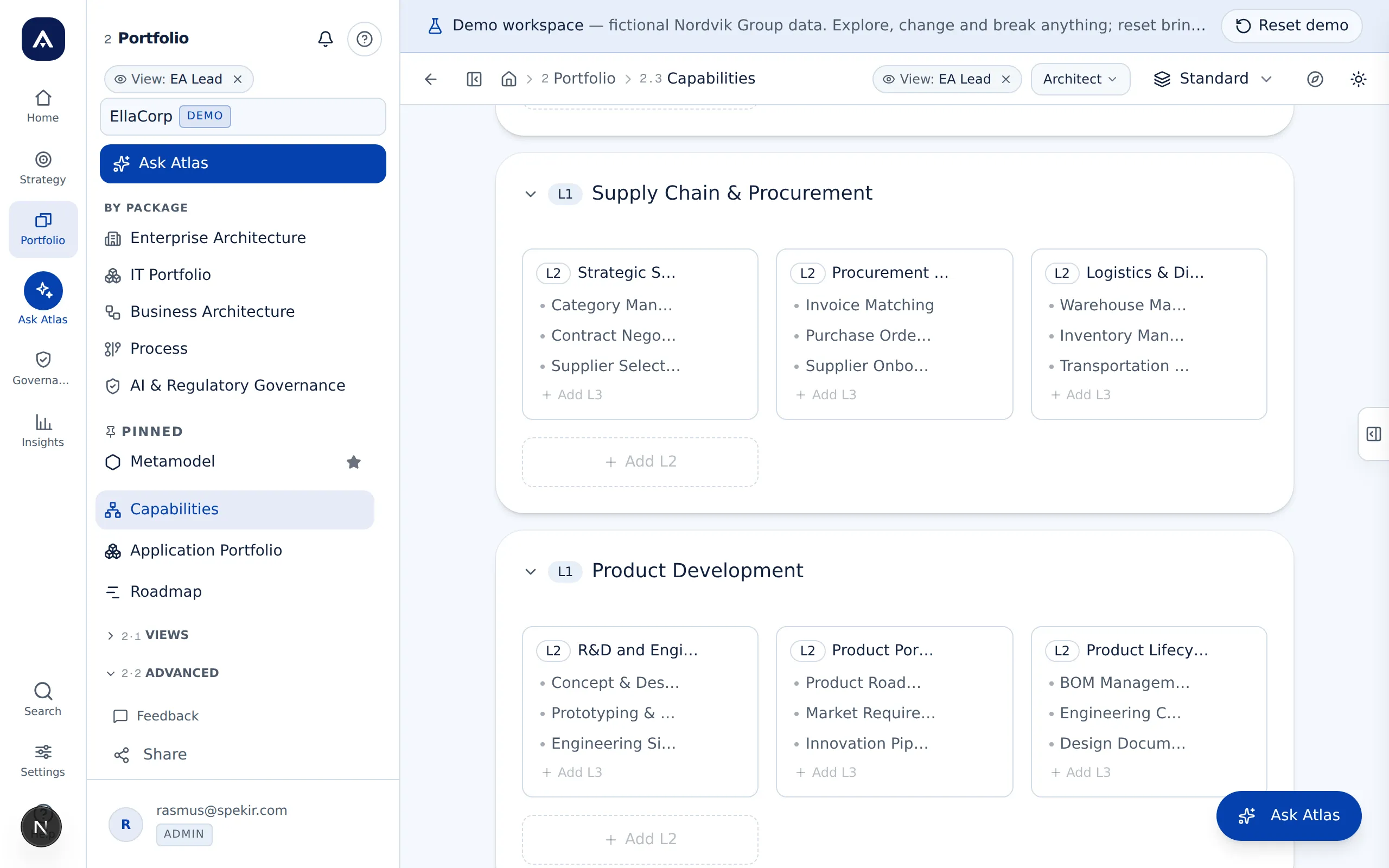
Start from a map, not a blank page
Import APQC PCF v8 and get a recognised three-level structure straight away, or have Atlas propose a map for your industry. A blank page usually costs three workshops before anyone disagrees about something that matters.
Three levels, and no more
Level 1 is what the business is built from, levels 2 and 3 are what those are made of. Go one level deeper and you have stopped describing what you need to be able to do and started describing how you do it. That is a process, and processes belong elsewhere in the model.
Link every capability to the applications that realise it
This is where the map stops being decoration. Once the link exists as data, which systems carry the thing we cannot lose becomes a lookup instead of a round of emails, and what breaks if this vendor goes down can be answered the same day.
Lay maturity and strategic weight over the top
Set current maturity, target maturity and strategic importance per capability. The heatmap then shows where the distance is largest in the places that matter most, which is the prioritisation an investment conversation actually needs.
Tie capabilities to value streams and journeys
Value streams describe how value gets created end to end, with each stage hanging off the capabilities behind it, and customer journeys sit on top. Every view reads from the same catalog, so there is no separate modelling tool to keep in sync.
Roll cost up to what the strategy costs
Application cost rolls up through capabilities to strategic objectives. That is the question a flat portfolio tool cannot answer, because it has no strategy layer, and it is the end of the map that makes the work of building it easy to defend.
Questions worth asking
Use case
Something the organisation has to be able to do, described independently of who does it and which system it happens in. Manage customer orders is a capability. Order management in D365 is not; that is an application which realises one.
A capability says what. A process says how. Onboard a new employee stays the same capability whether onboarding runs on paper or through a portal, and it survives you replacing both.
Three is enough. Three levels let you place each application precisely enough for the map to answer something, and they stop it turning into a process description in disguise. A fourth level is almost always a how.
Few enough that people can hold them in their heads, which in practice is around seven to ten. If nobody can recite the top level without looking it up, the map has stopped being a shared language.
Eight things, in our experience. It describes what, not how. It does not overlap, so a level 2 can be placed without an argument. It uses the same name for the same ability across business units. It is small enough to remember and no more than three levels deep. It survives a reorganisation without being redrawn. Every capability has an owner. Every capability is linked to the applications that realise it, because a map without applications is a poster. And in the end it can answer what the strategy costs.
No, and preferably not. Atlas imports APQC PCF v8 as a starting point, and there is a generator that drafts a three-level map for your industry. Correcting a map that is wrong in a handful of places is faster than agreeing on an empty one.
None. APQC is offered as a starting structure because it saves you a blank page, not because the model depends on it. Rename, merge and restructure freely; the map is yours, and Atlas keeps the links to applications and objectives intact while you do it.
An application list and an afternoon. You import the applications, import or generate the capability map, and link the two. The first useful answer shows up as soon as the first links exist, long before the model is finished.
03Use case